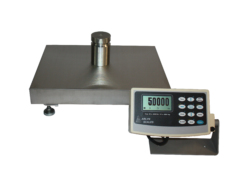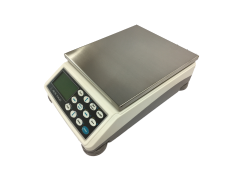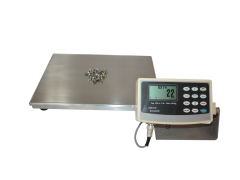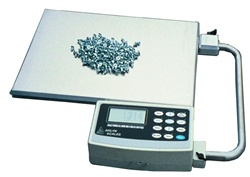
Choosing an industrial parts counting scale requires more than comparing maximum capacities or purchasing the model with the smallest displayed increment. The scale must detect the lightest individual part while supporting the heaviest complete batch, including its container.
The best system must also fit the platform dimensions, operating environment, operator workflow and data requirements of the application. A standard industrial counting scale may be the most economical choice for heavier components. A D-820 model may provide the necessary intermediate sensitivity. Lightweight parts, high-value components and large counts may justify an Ultra Precision SAW configuration.
This guide explains the questions buyers should answer before comparing industrial parts counting scales, indicators, communication options and suppliers.
What is the best industrial parts counting scale?
There is no single best model for every operation. The correct scale provides enough capacity for the complete load, fine enough readability for the individual piece, a platform that fits the container, suitable construction for the environment and the indicator or data options required by the workflow.
Start With the Parts, Not the Scale Catalog
A buyer should define the application before choosing a model. Begin by collecting information about the parts, containers, normal batch sizes and required inventory decisions.
The most important questions include:
- Are the individual pieces reasonably consistent in weight?
- What is the approximate weight of the lightest piece?
- What is the heaviest complete load, including its container?
- What sample size can be verified conveniently?
- What platform dimensions are required?
- How much count uncertainty can the process tolerate?
- Will the scale operate near vibration, drafts, static, moisture or chemicals?
- How will operators identify and recall different parts?
- Where must the count go after it appears on the display?
- Does the system need printing, barcode, networking or automation functions?
These answers create a usable specification. Without them, buyers may pay for unnecessary capacity or purchase a scale that cannot detect their lightweight components.
1. Are the Parts Consistent in Weight?
A counting scale calculates quantity by dividing the net batch weight by an average piece weight.
Calculated quantity = Net batch weight ÷ Average piece weight
The calculation assumes that the sample represents the average weight of the pieces in the complete batch.
Some variation is normal. Manufactured parts may differ slightly because of material tolerances, coatings, plating, moisture or production processes. A sufficiently large and representative sample can average small variations.
However, a counting scale may not be appropriate when nominally identical pieces vary substantially. The scale cannot distinguish between ten unusually heavy pieces and eleven lighter pieces when both groups have the same total weight.
Before selecting equipment:
- Weigh multiple examples of the same part.
- Compare different suppliers and production lots.
- Inspect for coatings, oil, moisture or attached packaging.
- Determine whether different revisions have different weights.
- Identify the inventory discrepancy the process can tolerate.
For high-value or critical inventory, test the proposed counting method with representative production parts before finalizing the equipment.
2. Determine the Lightest Individual Piece
The individual piece must be heavy enough for the scale to detect relative to its displayed readability.
Readability is the smallest weight increment shown on the display. It is not simply the number of decimal places, and it is not the same as overall accuracy.
For example, a scale that displays in 0.001 lb increments can show values such as 48.017 lb and 48.018 lb. The change between those readings is 0.001 lb—not 0.0001 lb.
As a conservative starting guideline, Arlyn recommends that the individual piece weight be approximately four times greater than the scale’s displayed readability.
Recommended individual piece weight ≥ 4 × displayed readability
Parts closer to the displayed increment may sometimes be counted with a large sample and highly consistent pieces, but the application should be tested and verified.
If the lightest piece is too small for a standard model at the required capacity, consider:
- A lower-capacity 820 model
- A D-820 model with finer readability
- An Ultra Precision SAW counting scale
- A multiple-platform system for light and heavy batches
3. Calculate the Required Maximum Capacity
Maximum capacity must include everything supported by the weighing platform:
- The parts
- The bin, tote, carton, tray or bag
- Any divider, fixture or holder
- Reasonable allowance for normal batch variation
Capacity should not be oversized unnecessarily. Higher-capacity models generally display weight in larger increments. Purchasing a 150 lb scale for batches that rarely exceed 10 lb may make lightweight pieces more difficult to count.
The objective is to choose the lowest practical capacity that can safely support the complete gross load.
Avoid the “largest possible scale” purchasing mistake.
More capacity is not automatically better. Unnecessary capacity can sacrifice displayed readability. If one uncommon part requires much more capacity than everything else, a second platform or separate scale may produce better results than compromising every routine count.
4. Compare the Available Performance Levels
Arlyn’s industrial counting line provides three primary performance levels.
| Selection Factor | 820 Series | D-820 Series | Ultra Precision SAW |
|---|---|---|---|
| Current capacity range | 10 to 150 lb | 10 to 150 lb | 10 to 200 lb in current counting configurations |
| Readability range | 0.002 to 0.05 lb | 0.001 to 0.02 lb | 0.0001 to 0.002 lb |
| Primary role | Economical routine industrial counting | Intermediate increase in readability | Lightweight parts and demanding high-value counts |
| Typical parts | General hardware, fittings and heavier components | Smaller components requiring better sensitivity | Light fasteners, electronics and valuable precision components |
| Choose it when | Its minimum piece-weight capability comfortably fits the application. | The standard model is too coarse but Ultra Precision is unnecessary. | Small weight differences create a meaningful inventory or production risk. |
Readability varies with capacity, so compare specific models rather than applying one specification to an entire family.
Representative 10 lb Model Comparison
The differences are especially visible when models with the same maximum capacity are compared.
| Model | Capacity | Displayed Readability | Conservative Piece-Weight Guideline |
|---|---|---|---|
| 820-X | 10 lb | 0.002 lb | Approximately 0.008 lb |
| D-820-X | 10 lb | 0.001 lb | Approximately 0.004 lb |
| SAW-X-PC | 10 lb | 0.0001 lb, approximately 0.05 g | Approximately 0.0004 lb or 0.18 g |
The Ultra Precision model should not be treated as automatically necessary. It is the stronger choice when the parts or inventory risk justify the finer measurement capability.
5. Choose a Sample Size That Represents the Batch
The scale calculates the average piece weight from the sample supplied by the operator. A small sample makes individual part variation and display rounding more influential.
Arlyn’s Quick Sample workflow supports convenient quantities such as 10, 25, 50 and 100 pieces. For heavier and highly consistent parts, a quick sample may be sufficient. For lightweight parts, large counts or valuable inventory, a larger acquired sample is generally preferable.
The ideal sample should:
- Contain only the correct part number.
- Represent the same production lot when lot variation matters.
- Be manually verified before acquisition.
- Be large enough to reduce the influence of individual variations.
- Be free from damaged parts, oil, moisture and packaging debris.
If an operation repeatedly packages 1,000 pieces, a stored sample developed from a larger quantity may provide a better average than a ten-piece quick sample.
6. Confirm the Platform and Container Fit
The platform must support the container without interference.
Check:
- Container length and width
- Maximum loaded height
- Operator reach and lifting requirements
- Nearby walls, conveyors or equipment
- Clearance around the weighing platform
- Whether the container concentrates weight in a small area
A tote or carton that touches a wall, workbench or conveyor may transfer part of its weight away from the scale. This can affect both the displayed weight and calculated quantity.
Arlyn manufactures its weighing systems directly and can discuss custom platform sizes or multiple-platform arrangements when standard dimensions do not fit the process.
7. Evaluate Construction and Operating Environment
An industrial counting scale should be selected for the conditions in which it will operate.
Potential influences include:
- Shock loading and accidental overload
- Vibration from machinery or conveyors
- Air currents around lightweight measurements
- Static electricity
- Moisture and washdown procedures
- Corrosive chemicals
- Temperature variation
- Dust and debris
Arlyn counting scales use industrial platforms with stainless steel weighing surfaces and rugged weighing components. However, the standard model should not automatically be assumed suitable for washdown, corrosive or hazardous locations. Those requirements must be identified before ordering so the complete configuration can be evaluated.
Ask about the entire weighing system.
A durable-looking platform does not by itself establish environmental suitability. Review the load cell, frame, indicator enclosure, connectors, cables, power supply and installation conditions.
8. Select the Appropriate Operator Interface
The indicator affects how operators create samples, recall parts, apply tare and transfer results.
| Selection Factor | MKE-5 Digital Indicator | Arlyn UpScale Touchscreen |
|---|---|---|
| Interface | Physical keypad and graphical LCD | Seven-inch color touchscreen |
| Best use | Straightforward standalone counting | Guided, connected or customized workflows |
| Part identification | Stored piece-weight descriptions | Touchscreen records with optional barcode workflows |
| Connectivity | Established serial, USB and Ethernet pathways | Wi-Fi, Web API, cloud, barcode and advanced protocol pathways |
| Choose it when | Operators need a durable, familiar button-driven station. | Identification, reporting and system integration are central to the project. |
The touchscreen does not change the weighing capability of the selected platform by itself. Capacity and readability remain determined by the weighing system. UpScale adds workflow and integration capabilities.
9. Decide How Counting Data Will Be Used
Do not purchase a communication option merely because its name is familiar. Begin with the system receiving the data and work backward to the correct interface.
| Requirement | Possible Pathway | Important Qualification |
|---|---|---|
| Nearby PC or printer | RS-232 or USB | Confirm the device, driver, software and output format. |
| Local network | Ethernet or Wi-Fi | Network access alone does not determine how the receiving application processes the data. |
| Existing PC application | Keyboard Wedge or compatible software interface | Test field order, delimiters and operator focus behavior. |
| Independent data collection | USB data logging | Define the stored fields and transfer procedure. |
| Custom business application | Web API | Software development and transaction handling are still required. |
| PLC or factory network | Modbus, EtherNet/IP or PROFINET | Confirm the protocol, controller and required UpScale configuration. |
| Traceable inventory workflow | Barcode identification plus data logging or software integration | Plan the part, bin, lot, employee and transaction identifiers before configuration. |
A USB port does not automatically mean that data will appear in Excel. Wi-Fi does not automatically provide secure off-site access. The complete data path—including scale, interface, network, software and business process—must be planned.
10. Consider Multiple-Platform Counting
Some operations count both very light parts and much heavier batches. Selecting one scale with enough capacity for the heaviest item may reduce the readability available for routine light-part counting.
A multiple-platform arrangement can provide:
- A small-capacity platform for acquiring samples and counting light parts.
- A larger platform for heavier containers or bulk quantities.
- A shared indicator or coordinated workflow.
- Better capacity matching across different inventory types.
The smaller platform should be used whenever the load fits because it generally provides the finer displayed increment. The larger platform can be selected when total weight exceeds the smaller platform’s capacity.
Discuss the platform-switching procedure, sample storage and indicator configuration before ordering.
11. Review Calibration and Verification Requirements
A factory-calibrated scale still needs an appropriate verification program after installation.
Ask:
- How will the scale be checked after delivery?
- What reference weights are appropriate?
- How frequently will performance be verified?
- What happens after the scale is moved?
- When should stored piece weights be reacquired?
- How will critical counts be compared with a reference method?
- Who will document verification and corrective action?
Calibration requirements depend on application risk, frequency of use, environmental conditions and internal quality procedures. Avoid suppliers who imply that no future verification will ever be necessary.
12. Compare the Supplier, Not Just the Scale
A technically capable scale can still be a poor purchase if the supplier cannot help configure, integrate or support it.
| Supplier Question | Why It Matters |
|---|---|
| Can you calculate the appropriate minimum piece weight? | The recommendation should be based on the actual part and model readability. |
| Can we test representative parts? | Application testing is valuable when parts vary or approach the scale’s capability. |
| Who manufactures and supports the system? | Direct technical access can simplify configuration and troubleshooting. |
| Can the platform or capacity be customized? | Standard configurations do not fit every container or process. |
| Which options must be installed at the factory? | Some future upgrades may require hardware or configuration decisions during ordering. |
| Can you document the data interface? | Integration requires more than the name of a port or protocol. |
| Can I speak with the factory team? | Direct communication helps prevent application requirements from being lost through multiple intermediary layers. |
Arlyn designs, assembles and supports its scale systems from its Long Island, New York facility. The factory-direct model allows customers to discuss unusual platforms, capacities, displays and integration requirements with the organization responsible for the equipment.
13. Evaluate Cost Through the Entire Workflow
Purchase price matters, but the lowest-priced scale may not be the most economical system.
Consider:
- Labor spent counting and recounting parts
- Inventory discrepancies
- Overfilled packages and incomplete orders
- Production interruptions caused by shortages
- Manual data-entry time and errors
- The cost of adding unsupported interfaces later
- Calibration and verification requirements
- Expected durability in the operating environment
- Technical support and customization
Do not purchase Ultra Precision simply because it is the highest-performing option. Purchase it when the finer readability solves an actual problem or reduces a meaningful business risk.
Likewise, do not reject an upgraded indicator or data interface solely because it increases initial cost. If it eliminates repeated manual recording or supports a required system connection, it may provide measurable long-term value.
Need help comparing configurations?
Provide Arlyn with representative piece weights, maximum batch weight, container dimensions, operating conditions and data requirements. We can help determine which performance level and options are justified.
Industrial Parts Counting Scale Buying Checklist
Use this checklist before requesting a quote:
| Requirement | Information to Collect |
|---|---|
| Individual parts | Lightest piece weight and expected variation |
| Complete load | Maximum parts, container and fixture weight |
| Sample | Typical verified sample size and normal batch quantity |
| Platform | Container dimensions, clearance and loading method |
| Environment | Vibration, drafts, moisture, chemicals, dust and temperature |
| Operator workflow | Part recall, tare, barcode, permissions and instructions |
| Data destination | Printer, PC, spreadsheet, network, API, cloud or PLC |
| Verification | Reference method, schedule and documentation |
| Final acceptance test | Representative parts, containers and real operating conditions |
Frequently Asked Questions
What is the most important specification for a parts counting scale?
Is a higher-capacity counting scale always better?
What is the difference between resolution and readability?
How light can an individual part be?
When should I choose an Ultra Precision SAW counting scale?
Can I store frequently counted parts?
Can a counting scale send data directly to Excel?
Do I need MKE-5 or UpScale?
Can one counting system use multiple platforms?
Can Arlyn build a custom counting scale?
Choose the Scale That Fits the Complete Application
The best industrial parts counting scale is the system that balances capacity, readability, platform size, sampling, construction, operator workflow and integration without adding unnecessary cost or sacrificing required performance.