Airport baggage scales are industrial weighing systems used at check-in counters, self-service stations, baggage conveyors, cargo areas and aircraft-loading operations. The right system must fit the available space, withstand repeated loading and provide the capacity, readability, display and data connections required by the airline workflow.
Arlyn Scales offers low-profile industrial platform scales with stainless-steel load cells, welded frames, multiple platform sizes and configurable digital indicators. Systems can be supplied for stand-alone weighing or integrated into compatible airport software, kiosks, conveyor systems and data-collection processes.
What type of scale is best for airport baggage?
A low-profile industrial platform scale is the best starting point for most airline baggage applications. Choose the platform dimensions and capacity according to the largest expected item, then select the construction, indicator and data outputs according to the installation environment and airport workflow. Counter, kiosk, conveyor and tarmac applications may require different configurations.
Where Are Baggage Scales Used in an Airport?
Baggage weighing is not limited to the staffed check-in counter. The weighing platform, display position and communication requirements depend on where the scale will operate and who will use it.
- Staffed check-in counters: The scale must fit the counter or conveyor opening while presenting a clear weight reading to the agent and, when required, the passenger.
- Self-service weighing stations: A passenger-facing display and simple operating sequence can help travelers identify an overweight bag before entering the check-in line.
- Conveyor systems: The weighing platform may need custom dimensions, mechanical integration and a compatible data output for the baggage-handling controls.
- Charter and regional aviation: Operators may need to record individual passenger, luggage and cargo weights together with loading-position information.
- Tarmac and mobile operations: Portability, battery power, display visibility and suitable environmental protection become important.
- Air cargo and freight areas: Larger platforms or higher-capacity floor scales may be required for freight, containers and palletized cargo.
How Do You Choose an Airport Baggage Scale?
Begin with the physical and operational requirements rather than selecting a scale by capacity alone. A scale that provides the correct maximum capacity may still be unsuitable if it does not fit the counter, survive the loading method or communicate with the airport system.
| Application | Recommended Starting Configuration | Options to Consider |
|---|---|---|
| Staffed check-in counter | Low-profile platform sized for the existing counter or conveyor opening | Remote-mounted display, USB, serial, Ethernet, keyboard wedge or custom platform size |
| Passenger self-weigh station | Accessible low-profile platform with a clearly positioned display | UpScale touchscreen, checkweighing, visual weight conditions and kiosk integration |
| Automated baggage conveyor | Custom or standard platform integrated into the conveyor structure | PLC communication, setpoints, relays, REST API, serial data or industrial network protocols |
| Charter or regional aircraft loading | Portable platform capable of weighing passengers, luggage and smaller cargo | Battery power, UpScale, custom fields, local data logging, email reporting and Wi-Fi |
| Outdoor or tarmac operation | Portable platform with installation-specific environmental protection | Battery power, protected connectors, suitable indicator enclosure and wireless data transfer |
| Air cargo and freight | Platform or floor scale sized for the largest cargo or pallet | Ramps, custom capacities, forklift protection, data logging and warehouse-system outputs |
| Best general starting point | Arlyn Series 3200 low-profile industrial platform scale | Configure the platform, construction, display and outputs for the actual baggage workflow |
Why Does Low-Profile Construction Matter?
A low platform reduces the distance through which an employee or passenger must lift a bag. It also makes it easier to move luggage between a cart, counter, conveyor and weighing surface.
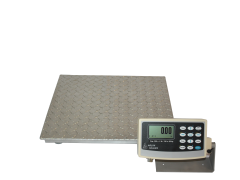
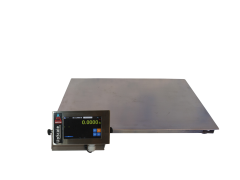
Many Arlyn Series 3200 platform configurations have a platform height of 1 7/8 inches. This compact profile can help:
- Reduce unnecessary lifting during repetitive baggage handling
- Make the scale easier to incorporate into an existing counter
- Reduce interference with adjacent conveyors or work surfaces
- Simplify passenger access at a self-service weighing station
- Decrease the severity of some side impacts from sliding luggage
Platform height varies with the selected size and configuration. Verify all dimensions before modifying a counter, kiosk or conveyor.
How Do Arlyn Platform Scales Handle Repeated Baggage Loading?
Airport scales regularly encounter luggage that is pushed, rolled or dropped onto the platform. This type of dynamic loading can apply more force than gently placing an item of the same static weight on the scale.
Arlyn platform scales use four stainless-steel load cells installed within a welded frame. Positioning a load cell near each corner supports consistent weighing when a suitcase is not placed precisely in the middle of the platform. The recessed design also helps protect the sensors from side impacts and routine industrial handling.
No scale is immune to damage. The selected capacity should include an appropriate margin above normal loads, and employees should avoid dropping items or exceeding the rated capacity.
Should an Airport Choose Aluminum or Stainless Steel?
Both Arlyn aluminum and stainless-steel platform models use stainless-steel load cells. The primary construction choice concerns the frame and platform rather than the sensor material.
- Aluminum construction is lighter and more economical. It can be a strong choice for portable indoor systems and applications where employees must reposition the scale.
- Stainless-steel construction provides greater resistance to corrosion and demanding industrial use. It may be preferable for permanent installations, frequent exposure to damp luggage or environments requiring more aggressive cleaning.
Stainless steel does not automatically make the complete weighing system waterproof or suitable for washdown. The indicator, connectors, cables and installation must also have protection appropriate for the environment. Arlyn can help evaluate enclosure and construction requirements.
What Capacity and Readability Are Available?
Standard Arlyn Series 3200 platform scales include configurations such as:
- 500 lb maximum capacity with 0.1 lb readability
- 1,000 lb maximum capacity with 0.2 lb readability
Available platform dimensions range from compact counter-scale sizes to platforms as large as 48 inches by 48 inches. Custom dimensions and capacities can also be discussed when a standard model does not fit the available space or baggage-handling equipment.
Capacity is the greatest load the scale is designed to measure. Readability is the smallest displayed weight increment. Neither value should be confused with accuracy. The appropriate specifications depend on the largest expected bag, container or passenger and the operational requirements of the airline.
How Can a Baggage Scale Connect to Airport Software?
A basic installation may only require a visible local display. Other airport systems need the scale to transmit weight to check-in software, a kiosk, a baggage-handling controller or an offsite operations team.
Depending on the indicator and options selected, Arlyn systems can support:
- RS-232, RS-422 or RS-485 serial communication
- USB virtual serial communication
- Ethernet TCP/IP
- Wi-Fi with a compatible UpScale configuration
- Keyboard-wedge entry into compatible computer fields
- USB data logging
- REST API access
- Modbus, EtherNet/IP or PROFINET
- Analog outputs and setpoint control
The correct connection depends on the receiving software or controller. Before ordering, identify the required data format, protocol, connector, update rate, command structure and network conditions. Availability varies by indicator and configuration.
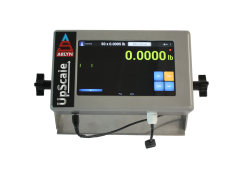
When Is the UpScale Touchscreen Useful for Airline Weighing?
The standard MKE-5 indicator is suitable when an agent primarily needs to view weight, tare the scale and send a simple reading. The optional Arlyn UpScale Touchscreen Indicator is useful when the baggage workflow requires more information or automation.
UpScale can be configured to support:
- Custom fields for passenger, flight, bag, cargo or loading-position information
- Local data logging and USB export
- Scheduled or on-demand email reports
- Google Sheets integration
- Barcode and QR-code functions
- User accounts and operator tracking
- Checkweighing and visual weight conditions
- Cloud monitoring
- REST API and industrial communication options
In an Arlyn airline case study, a charter operator used platform scales with UpScale indicators to record passenger and luggage weights, associate each item with a loading location and email formatted data to an offsite system. This replaced several manual transcription steps.
Planning a Counter, Kiosk or Conveyor Installation?
Provide the opening dimensions, expected loads, operating environment and required software connection. Arlyn can recommend a standard platform or evaluate a custom OEM baggage-weighing configuration.
Can Arlyn Build a Custom Baggage Weighing System?
Yes. Because Arlyn designs and assembles weighing systems directly, the platform dimensions, indicator position, communication hardware and software behavior can be evaluated together.
Custom and OEM projects can include:
- A platform sized for an existing check-in counter
- A weighing section for a compatible conveyor
- A remote passenger-facing or agent-facing display
- A self-service baggage checkweighing station
- Custom data fields and print formats
- Connections to existing airport or airline software
- Portable systems for charter and tarmac operations
- Multiple platforms reporting to a coordinated system
A custom mechanical fit does not by itself guarantee software compatibility. Arlyn should review both the physical installation and the required data interface before the system is specified.
What Should You Confirm Before Ordering?
- Maximum expected baggage, passenger or cargo weight
- Required readability and units of measurement
- Available platform or counter dimensions
- Indoor, outdoor, damp or corrosive operating conditions
- Frequency and method of loading
- Fixed or portable installation
- Local display and remote-display requirements
- Required software, PLC or network connection
- Data fields, reports, labels or barcode functions
- Available AC, DC or battery power
- Applicable airport, airline and local weights-and-measures requirements
If baggage weight will be used to determine a customer charge, confirm the legal-for-trade and inspection requirements that apply to the installation before selecting the equipment.
Frequently Asked Questions
What type of scale is used to weigh airport baggage?
What capacity should an airport baggage scale have?
Can Arlyn make a baggage scale for an existing counter?
Can a baggage scale send weight to airline software?
Can the scale record passenger and luggage information?
Are aluminum platform scales durable enough for airports?
Are Arlyn platform scales waterproof?
Can a baggage scale be used to calculate passenger fees?
Configure an Airport Baggage Weighing System
Arlyn Scales can help you select a standard platform, configure the required data outputs or develop a custom weighing system for a counter, kiosk, conveyor, tarmac or cargo operation.
Shop Platform Scales
Request a Custom Configuration
Call 800-645-4301 to discuss the installation with Arlyn Scales.
Related Logistics & Warehouse Scale Solutions
Explore weighing solutions for inventory management, shipping, warehouse automation, aviation, pallet handling, harsh environments, and other logistics applications:
- Inventory Scales for Warehouse Management & Control
- Industrial Shipping Scales for Packages & Pallets
- Platform Scales with Printers for Warehouse Automation
- Specialty Scales for Logistics Companies
- Parcel & Postal Scales
- Outdoor Pallet Scales for Harsh Environments
- Aircraft Scales for Passengers & Luggage
- Crane Scales for Ship Loading
- Pallet Scales for Warehouse & Inventory Management