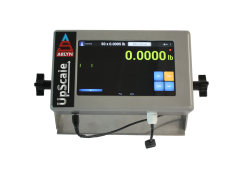
Upgrading to the Arlyn UpScale Touchscreen Indicator gives an industrial scale a larger visual interface, more flexible data management, remote monitoring, network connectivity, process-control tools, and integration options that are not available on a basic push-button indicator.
A traditional scale indicator works well when an operator only needs to view a weight, apply a tare, change units, and print a basic reading. The UpScale is designed for operations that need the scale to do more: record and distribute data, identify users and products, communicate with business or automation systems, send alerts, manage multiple recipes, or provide remote access to weight information.
The Arlyn UpScale Touchscreen Indicator combines a 7-inch HD IPS color touchscreen with Arlyn’s industrial weighing software. It can be configured for standard strain-gage scales, Ultra Precision SAW scales, and certain compatible third-party weighing systems.
What Is the Arlyn UpScale Touchscreen Indicator?
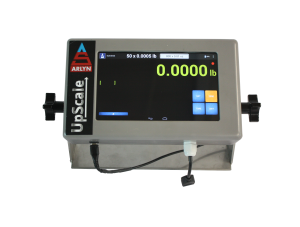
The Arlyn UpScale is a programmable digital weight indicator that displays measurements from an attached industrial scale platform. It provides the basic functions expected from a scale indicator while adding a graphical touchscreen interface, expanded record storage, network communication, data-management applications, and industrial integration options.
The indicator includes a 7-inch HD IPS capacitive touchscreen with a 1024 × 600 display. Its context-based interface presents controls according to the feature or task being used, helping operators navigate advanced functions without relying on combinations of small physical buttons.
Depending on the selected configuration, the UpScale can support:
- Basic weighing, zero, tare, gross, and net functions
- Parts counting and stored samples
- Checkweighing
- Setpoint and relay control
- USB data logging
- Scheduled and on-demand data log emails
- Google Sheets data logging
- AxChange cloud monitoring
- Barcode and QR-code scanning or printing
- User accounts and operator tracking
- Custom print fields and print formats
- Flow-rate measurement
- REST Web API access
- Modbus, EtherNet/IP, and PROFINET configurations
- Ethernet, Wi-Fi, USB, serial, and analog outputs
Features depend on the options purchased with the indicator. Not every function is included in the base configuration.
When Should You Upgrade to a Touchscreen Scale Indicator?
You should consider upgrading when the limitations of a basic scale display create additional manual work, restrict data access, or make integration difficult.
The UpScale is especially useful when your operation needs to:
- Save more tare, sample, setpoint, or product records
- Search and sort stored records more efficiently
- Collect weight data automatically
- Send reports to employees without transferring a USB drive
- Notify personnel when a target weight is reached
- View scale information from another room or facility
- Connect the scale to a PLC, ERP system, database, or custom application
- Identify products or operators with barcodes, QR codes, or user accounts
- Operate several weighing platforms from one display
- Create a more visual and guided operator workflow
The UpScale should not be selected only because it has a touchscreen. Its strongest value comes from combining the touchscreen with the applications and communication options that support your process.
Arlyn UpScale Versus a Standard MKE-5 Indicator
Both indicators can provide dependable weight readings and common scale functions. The primary difference is the level of workflow automation, record management, connectivity, and user interaction.
| Feature | Arlyn UpScale Advanced touchscreen, connectivity, and automation |
Standard MKE-5 Dependable basic industrial weighing |
|---|---|---|
| Display | 7-inch HD IPS color touchscreen | 3-inch monochrome graphic display |
| Controls | Context-based touchscreen menus | Sealed physical keypad |
| Basic weighing functions | ✓ Included | ✓ Included |
| Stored tares and samples | Expanded storage with search and sorting | Up to 100 stored records |
| Setpoint recipes | Expanded recipe management | Three recipes |
| Emailed data logs |
✓ Available Requires logging and network options |
— Not available |
| Email at target weight |
✓ Available Requires setpoint and network options |
— Not available |
| Google Sheets logging | ✓ Available | — Not available |
| AxChange cloud monitoring | ✓ Available | — Not available |
| REST Web API |
✓ Available Requires Ethernet or Wi-Fi |
— Not available |
| Industrial protocols | Modbus, EtherNet/IP, and PROFINET configurations available | — Not available |
| Barcode and QR-code functions | ✓ Available | — Not available |
| User management | ✓ Available | — Not available |
| Best suited for | Connected, automated, data-driven, or multi-step weighing processes | Basic local weighing and straightforward operator control |
Use a More Visual Touchscreen Interface
A conventional indicator must fit its controls into a limited number of physical buttons. As more functions are added, operators may need to remember button combinations, abbreviations, or menu paths.
The UpScale uses a visual interface that can present labels, menus, records, and controls according to the current task. This gives the indicator more room to explain functions and display information.
Reduce Operator Navigation Errors
Context-based controls help reduce screen clutter by presenting the functions that apply to the selected feature. This can make it easier for employees to locate a tare record, select a part, configure a setpoint recipe, or start a logging operation.
Improve Weight Visibility
The large color display makes the primary weight reading easier to see from normal working distances. Users can also configure display colors and visual conditions to help distinguish operating states, alarms, gross weight, net weight, and other information.
Support Repeatable Workflows
Stored records, named recipes, user accounts, custom fields, and barcode functions can guide operators through repeatable procedures instead of requiring them to enter the same information manually during every weighing cycle.
Automate Scale Data Logging and Email Reports
Manual recordkeeping requires an operator to read the display, write or type the result, add identifying information, and deliver the record to the correct person. Each step takes time and creates an opportunity for an error.
With the appropriate data-logging option, the UpScale can record weight with associated information such as the date, time, item, group, user, or custom fields.
Save Data Locally
Weight records can be stored and exported to a USB flash drive for review in spreadsheet or database software.
Email a Data Log on Demand
An operator can send the current data log to a configured email recipient without removing the USB drive and transferring the file through another computer.
Schedule Automatic Data Log Emails
The scale can also send data logs according to a defined schedule. This can support:
- End-of-shift reports
- Daily inventory summaries
- Production-run records
- Weekly usage reports
- Periodic quality-control documentation
Emailed data logs require the data-logging option together with Ethernet or Wi-Fi connectivity.
Log Weight Data Directly to Google Sheets
The UpScale can send weight records to a configured Google Sheet when the required data-logging and Ethernet or Wi-Fi options are installed.
This allows authorized employees to:
- View scale data from another workstation or facility
- Share a common weight record between departments
- Use spreadsheet formulas, filters, and charts
- Monitor material consumption over time
- Reduce manual data entry
- Review data without installing proprietary desktop software
For example, a scale beneath a chemical tank could send periodic weight readings to Google Sheets. Purchasing and production personnel could use the same spreadsheet to review usage and estimate when the material will need to be replenished.
Learn more about logging industrial scale data with Google Sheets.
Receive Setpoint Email Alerts and Control Equipment
A setpoint is a programmed weight condition that causes the scale to activate an output or perform another action.
Setpoints can be used with compatible equipment such as:
- Pumps
- Valves
- Feeders
- Mixers
- Motors
- Warning lights
- Audible alarms
- External relays
The UpScale expands this function by allowing a target weight to trigger an email or transmit a defined weight record through an available digital output.
Example: Low-Material Alert
A company could place a gas cylinder or material container on a scale and configure an email notification for a low-weight threshold. When the reading reaches that value, the UpScale can notify the employee responsible for replacement or replenishment.
Example: Filling Confirmation
During a filling operation, setpoint outputs can control compatible equipment as the weight approaches the target. The UpScale can also send or print a record when the target is reached.
This turns the scale reading into an immediate operational event instead of requiring an employee to watch the display continuously.
Monitor Scale Weight Remotely with AxChange
AxChange is Arlyn’s cloud-based weight monitoring and tracking platform. With a compatible UpScale configuration, authorized users can review live and historical scale information from a web-enabled device.
AxChange can support:
- Remote live-weight viewing
- Historical weight records
- Email or text notifications
- Consumption and inventory monitoring
- Multiple scales or facilities
- Data export and reporting
- Offline storage and later synchronization
- Remote scale functions, depending on configuration and permissions
AxChange is especially useful when a manager needs centralized visibility into tanks, cylinders, containers, ingredients, waste vessels, or production systems located across a facility or at multiple sites.
Connect the Scale to Software, PLCs, and Industrial Networks
Modern weighing data often needs to move beyond the indicator. Production systems may require a PLC to receive the weight, an ERP system to store it, or a custom application to display and process it.
REST Web API
The optional UpScale Web API allows compatible software to request weight data through an Ethernet or Wi-Fi network connection. This can support integration with:
- ERP and inventory systems
- Manufacturing applications
- Custom dashboards
- Databases
- Web applications
- Cloud or edge systems
API access can reduce manual data entry and allow weight information to become part of an existing business workflow.
Industrial Communication Protocols
Depending on the selected configuration, UpScale systems can support:
- Modbus RTU or ASCII
- Modbus TCP
- EtherNet/IP
- PROFINET
- RS-232
- RS-422 and RS-485
- USB communication
- Ethernet TCP/IP
- Wi-Fi TCP/IP
- Analog 4–20 mA or voltage output
Available protocols and hardware vary by configuration. Confirm the required PLC, network, and communication details before ordering.
Keyboard Wedge Output
The keyboard-wedge option allows the scale to enter weight data into the active field of a compatible computer application as though the value had been typed on a keyboard. This can simplify data entry into spreadsheets, web forms, ERP screens, and database applications without requiring specialized wedge software.
Use Barcodes, QR Codes, User Accounts, and Custom Fields
Advanced weighing processes often require more context than a weight value alone. The business may also need to record the operator, part number, lot, container, customer, work order, or production stage.
Barcode and QR-Code Functions
Optional barcode and QR-code functions can help operators identify products or records without typing each value manually. Depending on the configuration, the scale can support scanning and printing functions for applications such as:
- Parts counting
- Product identification
- Inventory transactions
- Batch tracking
- Shipping labels
- Container identification
User Management and Time Tracking
User accounts can control access and associate a username and timestamp with recorded or printed weight information. This can help supervisors identify who performed a weighing operation.
Custom Data Fields
Custom fields allow an organization to add application-specific information to printed or recorded output. This can include a job number, batch number, customer name, product code, location, or other identifier.
Import and Export Records
With the appropriate data-logging option, users can import or export tables such as tares, parts samples, users, and setpoint records. This can simplify backups, migration between scales, and the transfer of existing product data.
Customize Stability and Filtering for the Application
The UpScale does not change the inherent accuracy of the connected load cells or scale platform. Its value is that it provides configurable controls for how the weight signal is filtered, stabilized, displayed, and used.
Available controls include:
- Software filtering
- Stability control
- Zero tracking
- Motion detection
- Zero and stability behavior
Stronger filtering can produce a steadier display in an environment with vibration or moving material, but it may also slow the response to weight changes. Lighter filtering may respond faster but show more movement.
The correct settings depend on whether the application prioritizes rapid response, display stability, flow-rate updates, filling control, or the detection of small weight changes.
Choose an Indicator Enclosure and Mounting Position
The standard UpScale is housed in a molded enclosure with gasket protection intended to help resist moisture. It should not automatically be treated as waterproof or suitable for every washdown condition.
A stainless-steel NEMA 4X enclosure option is available for applications requiring greater protection from moisture, corrosion, cleaning procedures, or harsh industrial environments.
A stainless-steel swivel bracket allows the display to be positioned for visibility and can support installation on a:
- Table or work surface
- Wall
- Post or pillar
- Nearby equipment structure
Because the indicator can be mounted separately from the weighing platform, users can place the screen where it is easier or safer for an operator to reach.
Can You Add an UpScale to an Existing Scale?
The UpScale is available with many Arlyn strain-gage and Ultra Precision SAW weighing systems. It can also be configured as an upgrade or replacement indicator for certain existing installations.
Arlyn offers a third-party integration method for some non-Arlyn scale indicators. In this type of installation, the UpScale receives and processes weight data from the existing scale system so the user can access UpScale features such as Google Sheets logging, network communication, or email alerts.
Compatibility is not automatic. Before ordering an indicator for an existing scale, provide:
- The scale manufacturer and model
- The existing indicator model
- Load-cell type and wiring information
- Capacity and readability
- Available data-output format
- Photographs of connectors and labels
- The UpScale features you need
Arlyn should confirm electrical, mechanical, signal, and communication compatibility before the system is purchased or modified.
Which Applications Benefit Most from the UpScale?
Inventory and Material Monitoring
Google Sheets logging, AxChange monitoring, and weight-based alerts can help track the amount of material remaining in tanks, drums, cylinders, totes, and bins.
Filling, Batching, and Dispensing
Setpoint recipes, relays, visual status information, and network outputs can support repeatable filling and batching procedures.
Parts Counting
Expanded sample storage, search tools, import and export functions, barcode identification, and custom fields can improve counting workflows involving many part numbers.
Quality Control
User identification, timestamps, custom print fields, automatic records, and checkweighing functions can help document inspections and product-weight verification.
Manufacturing Automation
PLC protocols, serial communication, analog output, setpoints, and Web API access allow the scale to exchange data with manufacturing equipment and software.
Remote and Multi-Site Operations
AxChange, emailed reports, Google Sheets, and network connectivity allow employees to review scale information without standing beside each scale.
Flow-Rate Measurement
The optional Flow Rate Measurement Program calculates flow by measuring changes in weight over time. The visual interface allows operators to view and configure the process from the scale.
How Do You Choose the Right UpScale Configuration?
Begin with the weighing application rather than selecting every available option. Determine what the operator must do, what information must be collected, where the information must go, and what equipment must respond to the weight.
Before requesting a configuration, identify:
- The scale model or platform
- Maximum capacity and required readability
- Number of weighing platforms
- Required operator functions
- Data-logging frequency
- Email or cloud-monitoring requirements
- Barcode or user-identification needs
- Computer, PLC, ERP, or database connections
- Required communication protocol
- Environmental and enclosure requirements
- Need for setpoints, relays, or alarms
This information helps Arlyn configure the indicator with the features your process will use while avoiding unnecessary options.