Scale Integration with Arlyn UpScale
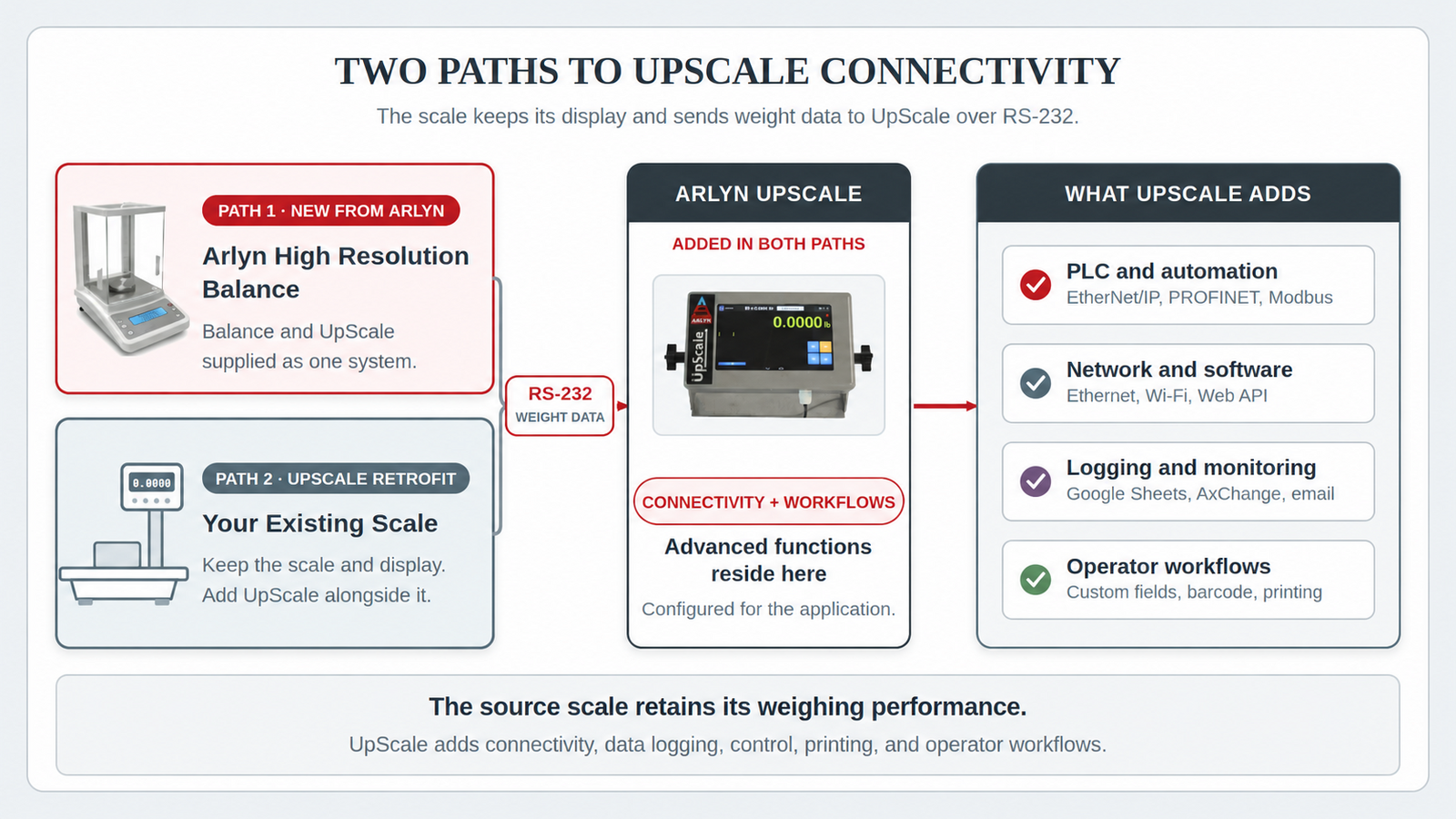
Arlyn UpScale supports industrial scale integration through two paths: a new Arlyn-supplied High Resolution Balance with UpScale, or an UpScale Retrofit for a compatible customer-owned scale. The source instrument continues to measure and display weight while UpScale receives its RS-232 data and provides the selected communication, logging, control, printing, identification, and workflow functions.
UpScale Connected High Resolution Balances
An UpScale Connected High Resolution Balance combines a fine-weighing instrument with UpScale and the selected communication or workflow options. The balance’s integrated display continues to measure and show the weight while supplying that data to UpScale over RS-232.
Arlyn uses High Resolution Balances as one product family for milligram, sub-milligram, and other fine-weighing requirements. Use the High Resolution Balance page to select a new Arlyn-supplied system by application, load, readability, and operating environment.
UpScale Retrofit for Existing Scales
A customer may already have a laboratory balance or industrial scale with an integrated display. The original display remains in place, continues its normal weighing functions, and sends weight data to UpScale through RS-232. This path depends on a compatible weight-data stream and supported protocol.
The source scale continues to measure and display the weight. UpScale receives that weight and provides its own touchscreen, communication, logging, automation, and operator workflow functions.
UpScale Functions Available for Either Path
The selected UpScale configuration can provide these functions for either an UpScale Connected High Resolution Balance or an UpScale Retrofit:
For laboratory-specific interface and data-workflow selection, see Laboratory Balance Connectivity.
Custom fields, user records, time stamps, checkweighing, saved records, and guided operator tasks.
Local data logging, USB export, Google Sheets logging, emailed records, and AxChange monitoring.
Ethernet, Wi-Fi, Web API access, and connections to applications or databases.
Modbus, EtherNet/IP, and PROFINET options for PLC and automation systems.
Barcode or QR-code scanning, label printing, custom print frames, and product identification workflows.
Setpoints, relays, alerts, filling, batching, and related functions selected for the UpScale configuration.
UpScale can expand the interface, data handling, communications, and workflow. It does not change the original instrument’s maximum capacity, readability, sensor technology, stated accuracy, or environmental suitability.
Example Case: Direct Target-Weight Control
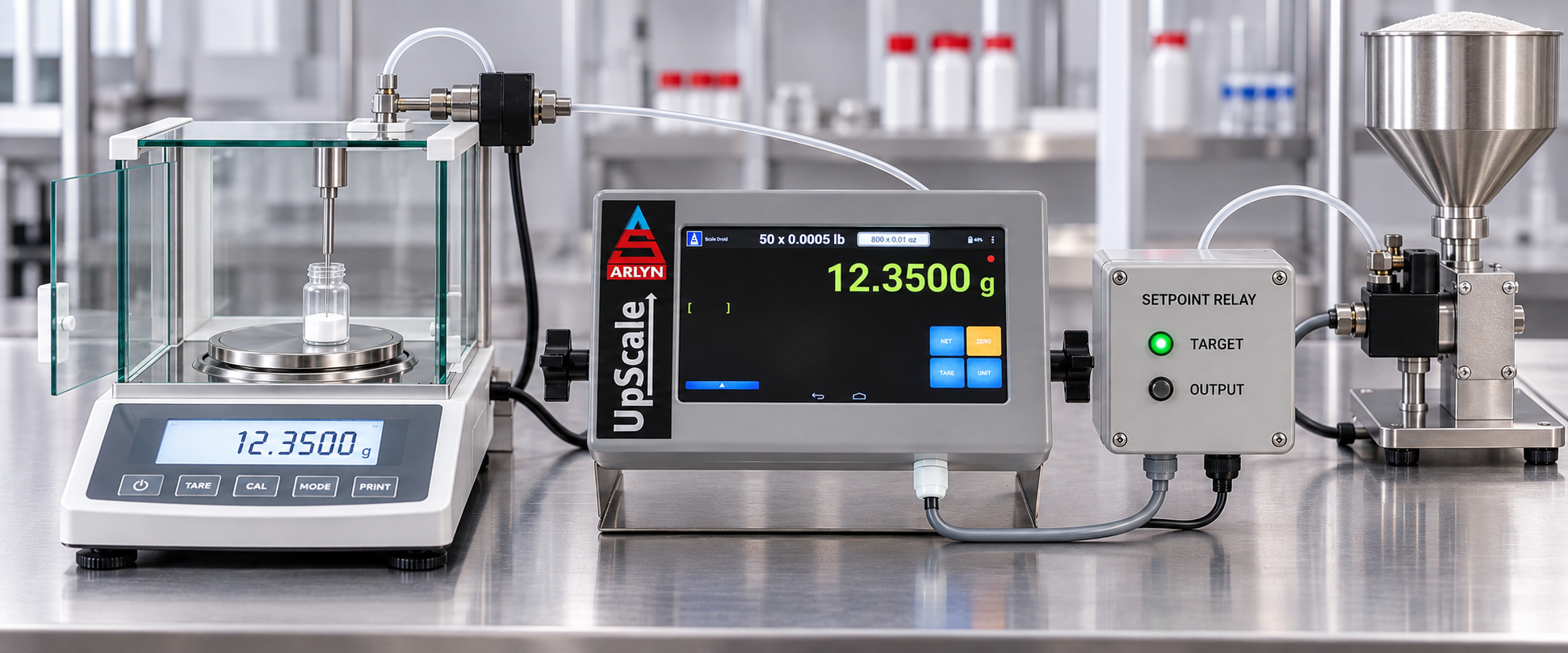
For applications that do not require a PLC, an UpScale setpoint can operate an external relay interface directly. When the target weight is reached, the relay output can stop a feeder, pump, or valve.
How the Integration Process Works
- Choose the path. Start with a new UpScale Connected High Resolution Balance or an UpScale Retrofit for a compatible customer-owned scale with an integrated display.
- Define the source connection. For an existing scale, the integration is based on the manufacturer, model, RS-232 connector and pinout, serial settings, weight-data format, units, status fields, and command or handshake requirements.
- Choose the UpScale functions. Select the touchscreen, logging, network, PLC, printing, identification, alert, and workflow options needed for the application.
- Configure and verify the connection. Arlyn prepares the supported data connection and selected UpScale functions, then verifies the approved configuration for the application.
Industrial Scale Integration Applications
- Retaining a suitable existing scale while changing how its weight data is recorded
- Providing weight data to a PLC, application, database, dashboard, or cloud service
- Adding operator identification, custom fields, barcode functions, or printing
- Standardizing the operator interface across different types of weighing equipment
Arlyn can configure a new High Resolution Balance with UpScale or integrate UpScale with a compatible customer-owned scale. Choose the path and functions that fit the weighing workflow.