Laboratory Balance Connectivity
When a laboratory selects a new High Resolution Balance, the measurement requirement and the data path should be specified together. Arlyn can supply a balance with its included RS-232 output for a straightforward local connection or configure the balance with Arlyn UpScale when the application also needs network access, software integration, PLC communication, data logging, printing, or operator workflow functions.
Use the High Resolution Balance’s included RS-232 output when weight data only needs to reach a nearby compatible computer, HMI, or printer. Specify an UpScale-connected system when the new balance must communicate through Ethernet, Wi-Fi, Web API, Modbus, EtherNet/IP, PROFINET, Google Sheets, AxChange, or another selected data and workflow option.
The balance continues to determine capacity, readability, accuracy, repeatability, and environmental suitability. UpScale adds only the selected interface, protocol, data, and workflow functions.
Start with the Destination for the Weight Data
Begin with the system that must receive the measurement and what it must do with the result. This usually shows whether native RS-232 is sufficient or whether the new balance should be configured with UpScale.
| Destination or requirement | Recommended path | What the laboratory should define |
|---|---|---|
| Nearby computer, HMI, or basic printer | Native RS-232 | Connector, cable, serial settings, output format, and receiving software |
| Networked application or database | UpScale with Ethernet or Wi-Fi and the selected Web API option | Network, data fields, commands, update behavior, and receiving application |
| PLC or automation network | UpScale with Modbus, EtherNet/IP, or PROFINET | PLC platform, required protocol, network, data mapping, and control behavior |
| Spreadsheet or retained weight log | Selected UpScale logging workflow or compatible PC software | Fields, trigger, file or sheet destination, review process, and retention needs |
| Remote monitoring | UpScale with AxChange and the required network access | Users, locations, alerts, access, and monitoring requirements |
| Sample identification, printing, or guided operator work | UpScale with the selected custom fields, user, barcode/QR, or printer options | Sample fields, operator steps, label or record format, and required hardware |
Connectivity Options for a New High Resolution Balance
RS-232 for a Local Connection
A new Arlyn-supplied High Resolution Balance includes RS-232 communication. This is often the simplest path when one balance sends a weight reading to a nearby compatible computer, HMI, or printer. The final connection uses the connector, cable, serial settings, output format, and command behavior required by the receiving system.
Ethernet or Wi-Fi for Network Access
Ethernet and Wi-Fi provide a network path for a configured UpScale system. They do not determine what happens to the weight data. The Web API, logging service, monitoring platform, or other selected function defines how the network connection will be used.
Web API for Laboratory Software and Databases
The UpScale Web API can provide weight data to a custom application through a verified network configuration. Define the required weight fields, commands, update behavior, receiving software, and security expectations before the system is configured. A Web API connection does not by itself establish a validated LIMS, ELN, ERP, or regulated record system.
Modbus, EtherNet/IP, or PROFINET for PLC Systems
Select the protocol already used by the automation system. Specify the PLC hardware, network, expected weight values, data mapping, and whether the PLC monitors the balance or acts on the result. See Arlyn’s PLC communication overview for protocol-level guidance.
Data Logging, Google Sheets, and AxChange
Different logging destinations serve different laboratory needs. A local or exported record may support work at the instrument. Google Sheets logging can place selected records in an online spreadsheet, while AxChange supports remote monitoring and weight tracking. The selected option may require network access, accounts, permissions, and a defined retention process.
Printing, Identification, and Operator Workflows
A connected balance can combine a weight with sample, lot, part, operator, or process information. Define the fields, scanner, printer, label or record format, users, and operator steps before choosing the applicable UpScale options.
Example: Send Laboratory Weight Data to a Networked Log
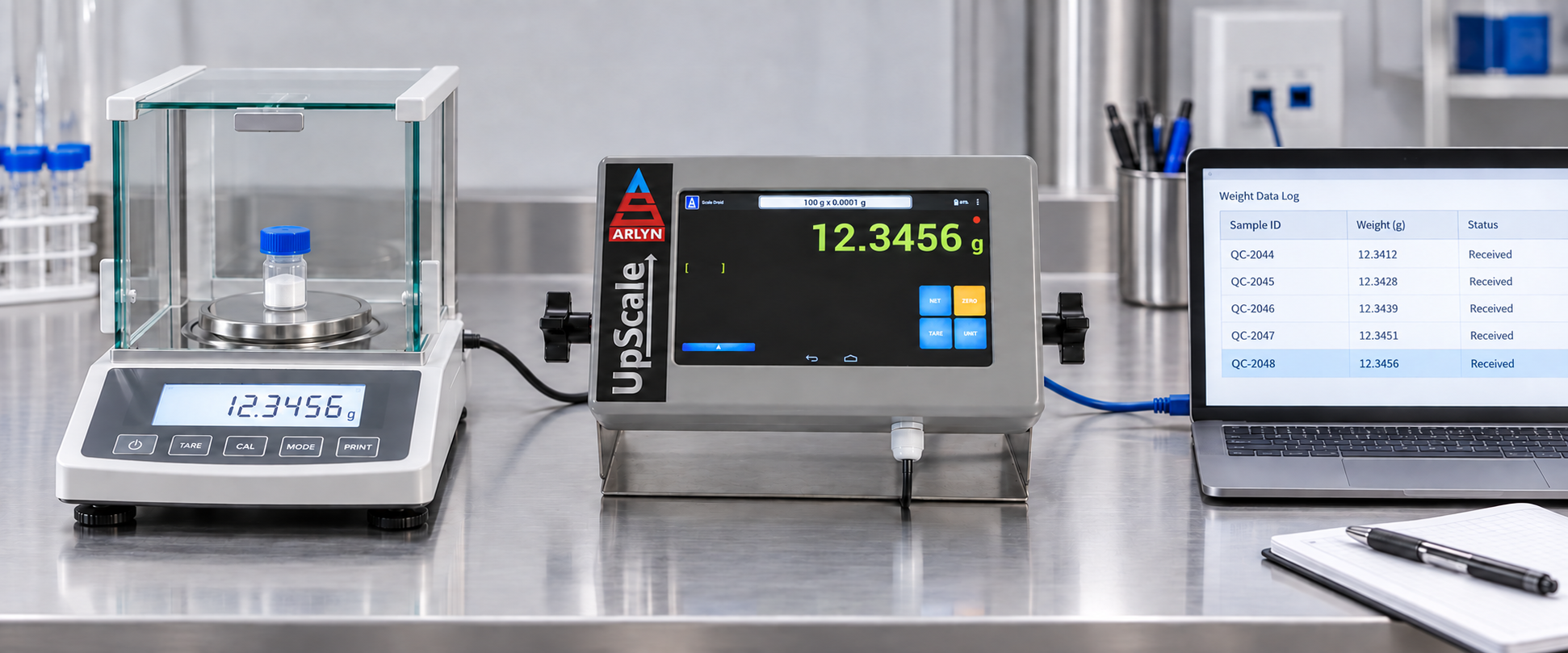
In this example, the weighing requirement and record destination define the balance model, UpScale options, network connection, data fields, and receiving-system configuration.
Specify the Balance and Connectivity Together
Connectivity cannot correct a balance that has the wrong capacity, readability, pan size, or environmental suitability. Start with the complete sample and container load, the smallest displayed increment required, the weighing environment, and the applicable calibration or method requirements. Then specify where the result must go and what the receiving system must do with it.
The balance determines the weight result and weighing performance. UpScale supplies the selected touchscreen, communication, data, and workflow layer. Adding UpScale does not improve the balance’s inherent accuracy or readability.
Compare Arlyn High Resolution Balances when selecting the balance model and readability. Use the Arlyn UpScale page to match the required data destinations and workflow functions.
Already Have a Compatible Balance?
This page covers connectivity specified with a new Arlyn-supplied High Resolution Balance. For a customer-owned or existing balance or scale, use Scale Integration with Arlyn UpScale for compatibility and implementation requirements.
Information Needed to Configure a New System
Define the measurement and connectivity requirements for the complete system:
- Maximum gross load, including the sample, container, and fixtures
- Required readability and applicable measurement or calibration expectations
- Sample and weighing-pan dimensions
- Operating environment, including vibration, drafts, temperature, and static concerns
- Receiving computer, software, database, PLC, cloud service, printer, or other destination
- Required network interface and industrial protocol
- Weight fields, trigger conditions, logging, identification, printing, or operator steps
- Security, access, validation, and record-retention requirements for the complete workflow
Configure a Connected Laboratory Balance
Share the load, readability, environment, data destination, and workflow requirements to identify the High Resolution Balance and UpScale options for the connected system.
Discuss a Laboratory Balance Configuration Compare High Resolution Balances