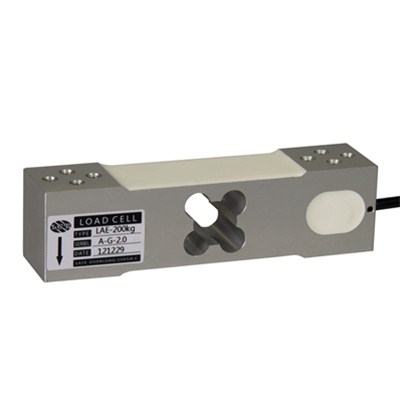
When a load cell starts to fail, it’s not just a minor inconvenience, it can bring production to a halt. Inaccurate readings ripple across operations: wasted materials, rejected shipments, compliance violations, and costly downtime. Because load cells are the backbone of every industrial scale, identifying problems early is critical to keeping your business running smoothly.
At Arlyn Scales, we’ve spent more than 40 years engineering solutions that not only detect failures but prevent them. From stainless steel construction to Surface Acoustic Wave (SAW) technology that eliminates many of the weaknesses of traditional strain gauges, our scales are built to minimize risk. In this guide, we’ll show you how to recognize the most common signs of damage — and why the right equipment makes all the difference.
Load Cell Troubleshooting Guide: How to Check Load Cells
Before checking your precision load cells, have your calibration information on hand. This helps you to identify the parameters and margins of error on input and output resistance, strain gauge resistance, and more.
We also recommend having a multimeter on hand to conduct certain tests so that you can identify the load cell’s current output with more accuracy.
Causes of Load Cell Damage
Load cells are precision instruments, but their environment and handling can compromise accuracy. Here are the most common causes of failure — and steps to mitigate them:
1. Mechanical Shock or Mishandling
- Cause: Dropping or overloading the load cell can deform the body or damage internal strain gauges.
- Result: Inconsistent readings, permanent drift, or complete failure.
- Prevention: Choose robust stainless steel construction over aluminum. Arlyn’s stainless steel load cells are designed to absorb shock and resist distortion in demanding industrial settings.
2. Moisture and Corrosion
- Cause: Exposure to water, humidity, or chemicals can short out electronics or corrode internal components.
- Result: Intermittent signals, oxidation, and early failure.
- Prevention: Use sealed, corrosion-resistant load cells. Arlyn designs stainless steel cells with waterproofing for long-term performance, even in wet or corrosive environments.
3. Electrical Surges
- Cause: Lightning strikes, unstable power, or sudden electrical spikes can overwhelm sensitive strain gauges.
- Result: Burnt circuitry, distorted signals, or permanent loss of calibration.
- Prevention: Ground and shield your system, and use surge protectors. Arlyn’s intrinsically safe and explosion-proof options add an extra layer of protection in high-risk environments.
One strategy is to shield and ground your load cells. Also, you should implement surge protectors if connecting them to an external power source.
Checking Your Load Cells for Signs of Damage
Before conducting an assessment of any load cell, disconnect the load cell from any power sources. Your safety comes first before diagnosing any problems.
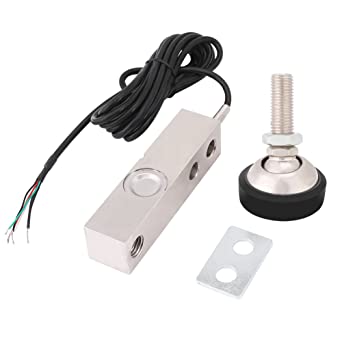
The first thing you should do is look at your load cell to find potential problems. A visual check may uncover physical damage that could be affecting the results — after all, the obvious signs often lead to the answer.
Visual Checks on Load Cells
The load cell body should be intact and free of any obvious damage. The damage that happens to the exterior can affect the strain gauges on the inside, which in turn skew the measurements.
Aluminum is more prone to mechanical damage compared to stainless steel. Therefore, we typically recommend using a load cell body of stainless steel as opposed to aluminum.
Stainless steel is designed to be durable, waterproof, and corrosion-resistant with a high heat threshold. Even so, like other elements, stainless steel can be damaged, although it is more robust when compared to aluminum.
You can also determine if the load cell is bending unnaturally.
Since strain gauges are designed to measure resistance when an object is weighed, the cell itself should bend with the strain gauge. If that isn’t the case, then that could be another cause of issues.
The cell body’s flatness is very important for preventing load cell creep. You can make sure that the cell has not been distorted from shock overload or mishandling.
Cable connections are another potential concern.
Identify your cable connections as well; load cells have cables that connect to a power source, and use them to send signals. Damage to these cables can affect measuring the output, especially with sensitive equipment.
See if there are any cracks, distortions, ripping, or crimping on the load cell body or cables. In some cases, a short circuit may happen thanks to regular wear and tear.
Make sure that the mounting surfaces are consistent for the load cell, as disparities can skew the results. Finally, insufficient insulation can be another cause of inaccurate readings.
Electrical Leakage Checks
Resistance is one of the elements to check when testing your load cell for errors. This is because it’s related to potential electrical problems, such as causing the signals to become skewed or distorted.
You need a multimeter tool to run some of the tests that we recommend, as well as a voltage source.
 First, make sure that your power supply is stable and constant when connecting the load cell.
It may simply be that you need to improve the energy source to fix any load cell issues. In addition, electrical surges can disrupt the input and output resistance, whether from lightning strikes or electrical issues.
You can tell if the input or output resistance is off by 3 Ω, or more from the specified values. Always test your strain gauges’ resistance; it is the heart and soul of precision and accuracy.
If your load cell has more than one strain gauge, then they need to be tested individually. Improper resistance could mean that your load cell is overloaded and the calibrations are off.
How electrically insulated is your load cell?
Most load cells operate by sending electrical signals, and insulation resistance contribute to accuracy. It should be more than 5 Giga Ω in an ideal situation. Test the resistance, and if it’s below a threshold of 2 Giga Ω, then there could be a problem.
You also want to determine input and output resistance; the cell’s specification sheet will tell you which defaults are necessary to meet. A multi-meter will help with checking these parameters, and your margin of error is typically 0.1 Ω. The load cell may be bad if it surpasses the .1 Ω margin.
When not checking the resistances, take a look at the load cell’s zero balance.
The load cell should reset to zero in between measurements and when it is not weighing an item. You can test this externally, using a multi-meter.
Use the load cell without weighing anything on it, and divide the resulting output voltage by the input voltage. This will give you the zero balance, and you can determine if it matches within the numbers on the calibration sheet.
Preventing Load Cell Failures with Arlyn Scales
Load cell failures can start small — a drifting zero balance, an inconsistent reading, a cable connection that doesn’t look quite right. Left unchecked, these issues can cascade into costly downtime and compliance risks. Troubleshooting can help you spot problems early, but the most effective strategy is preventing failures in the first place.
That’s where Arlyn Scales makes the difference. Our stainless steel load cells resist shock and corrosion, our Surface Acoustic Wave (SAW) technology eliminates many of the weaknesses of strain gauges, and our intrinsically safe options protect operations in hazardous environments. With more than four decades of engineering expertise, we design scales that perform reliably under the toughest conditions.
If you’re ready to minimize downtime and improve accuracy across your operations, connect with our team today. We’ll help you evaluate your current load cells and recommend the right solution to keep your business running at full efficiency.